Integrating a Web Panel with Active Directory and a File Server
Challenges, Lessons Learned and Real-World Troubleshooting
One of the core goals of my homelab SOC project was to simulate a realistic corporate workflow where users authenticate using Active Directory and access shared files through an internal web portal.
This article is a deep dive into challenges faced while building the ADPanel — a Flask web application that authenticates users via LDAP and allows them to browse and download files from an SMB File Server.
This turned out to be far more complex than writing the application
The Goal
The initial idea was simple:
Build an internal web portal that allows domain users to:
- Log in using Active Directory credentials
- Browse corporate file shares
- Download files they are authorized to access
Architecture goal:
Application Diagram
User → Web App → Active Directory (LDAP)
User → Web App → File Server (SMB)
This sounds straightforward — until you try to integrate all components.
The Real Challenge:
The main difficulty of this project was not coding the web app, but making multiple enterprise technologies work together:
- LDAP authentication (Active Directory)
- SMB file access (Windows File Server)
- Python Flask web application
- Docker containerization
- Network isolation
Each technology uses different protocols, authentication models and networking assumptions.
Challenge 1 — Multi-Protocol Authentication Flow
The first major hurdle was understanding that:
LDAP authentication ≠ SMB authentication.
Even though both rely on Active Directory, they are completely independent sessions.
The Problem
The application was able to authenticate users successfully against Active Directory.
A simple LDAP bind confirmed that credentials were valid and the login flow worked as expected.
At this point, authentication seemed solved.
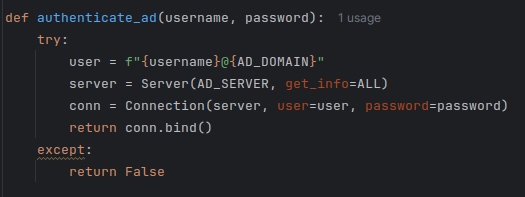
AD Auth Code Block
The application performs a direct LDAP bind using the user credentials. If the bind succeeds, the identity is validated by Active Directory.
However, immediately after login, the application still could not access the SMB file shares.
This was confusing at first: If the credentials were valid, why couldn’t the app access the files?
The answer lies in how enterprise protocols work.
LDAP only validates identity. SMB requires its own authenticated session.
This meant the application actually needed to authenticate twice:
Once this became clear, the workflow had to change. After validating the user via LDAP, the application needed to establish a second authenticated session, this time with the File Server.
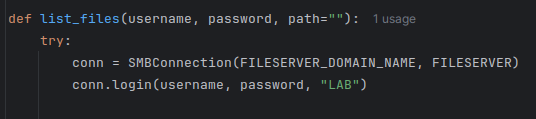
SMB Auth Code Block
This realization was a turning point in the project and reshaped the entire authentication workflow.
Solution
The final workflow became:
- User logs in using LDAP bind
- Credentials stored temporarily in session
- SMB connection established using same credentials
- File Server enforces NTFS permissions
This aligned authentication and authorization with real enterprise behavior.
Challenge 2 — Network Isolation and Connectivity
This was one of the most critical problems.
The lab environment contained:
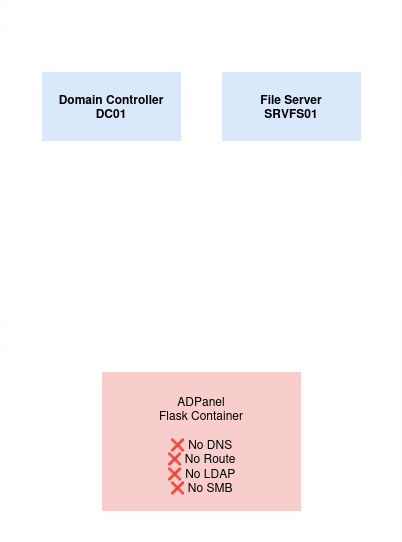
Network Diagram
- Active Directory server in an isolated network
- File Server in the same lab network
- Docker container running in a different network
Symptoms
- LDAP connection failures
- SMB connection failures
- DNS resolution issues
- Containers unable to reach domain services
At first, the application appeared broken — but the issue was network architecture, not code.
Root Cause
Containers do not automatically inherit host network routes or domain DNS configuration.
From the container’s perspective:
The domain controllers simply did not exist.
Solution
Several networking adjustments were required:
- Adjust Docker networking configuration
- Ensure container could reach lab subnet
- Configure routing and connectivity between environments
This step transformed the project from a simple web app into a real infrastructure exercise.
Challenge 3 — Containerization and Debugging in Docker
Migrating the app to Docker improved portability but introduced new complexity.
Problems Encountered
- Missing Python dependencies
- Broken runtime environment
- Harder debugging due to container isolation
A new error appeared
ModuleNotFoundError: No module named ‘flask’
This revealed that the environment was not reproducible.
Solution
The project evolved to include:
- Proper Dockerfile
- requirements.txt
- Fully reproducible build environment
This eliminated environment drift and standardized
Challenge 4 — Making Directory Navigation Work with SMB
SMB integration proved to be one of the most technical parts of the project.
The application must manually handle:
- SMB connection
- Session creation
- Tree connections
- Directory listing
- File downloads
This is significantly more complex than typical web development tasks.
Working with SMB introduced challenges such as:
- Error handling complexity
- NTFS compatibility considerations
- Understanding enterprise file access
Directory enumeration relied on the SMB listPath operation:
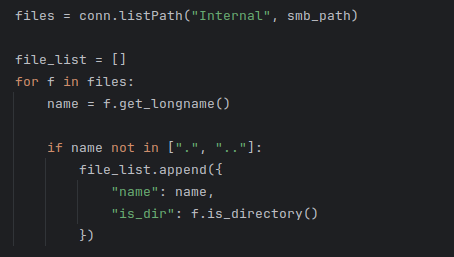
ListPath Code Block
This step moved the project closer to real infrastructure environment.
Challenge 5 — Preparing for SIEM Integration
As the lab evolved, observability became a new requirement.
Questions began to emerge:
- What events should be logged?
- How should authentication events be recorded?
- How should file downloads be tracked?
This shifted the mindset from application development to security operations.
Logging Requirements Identified
Future logging includes:
- Successful and failed logins
- File access and downloads
- Application activity
- Security events for SIEM ingestion
This step laid the foundation for full SIEM integration later.
Lessons Learned
This integration journey reinforced several important principles:
1. Infrastructure problems often look like application bugs
Many failures were caused by networking and architecture, not code.2. Authentication is easy — authorization is hard
Real access control depends on integrating with existing systems.3. Containers introduce both portability and complexity
Docker solved reproducibility but required deeper networking knowledge.4. Integration is the real challenge of security engineering
The hardest part was not building components, but making them work together.Conclusion
What started as a simple proof-of-concept evolved into a realistic enterprise-style integration project.
The ADPanel now:
- Authenticates users via Active Directory
- Accesses files via SMB using real permissions
- Operates inside a containerized environment
- Prepares events for SIEM monitoring
This experience highlighted the complexity of real-world environments and laid the foundation for future detection engineering and monitoring scenarios.